Sequencer (cfx_sequence)
A sequence is ChimeraFX's optional on-device orchestration layer. It starts one effect on one or more cfx_light entities, applies temporary settings, and can run actions at exact moments in the animation.
You do not need sequences for normal lighting. Effects run perfectly well from the Home Assistant light effect dropdown. Use a sequence when timing matters: starting a second strip halfway through a sweep, stopping several strips in order, reacting to an animation milestone, or building a local show that should keep working without a Home Assistant round-trip.
Already know the basics? Jump to the configuration reference, starting and stopping, or examples.
When to Use It
| Need | Use |
|---|---|
| Pick an effect manually in Home Assistant | Normal cfx_light effect dropdown |
| Save hardcoded defaults for one effect | Effect Presets |
| Start one named lighting routine from a button, sensor, HA dropdown, or HA service | cfx_sequence |
| Change another light at a sequence milestone without declaring a new sequence | cfx_set |
| Spawn a temporary child run with its own lifetime and triggers | cfx_run |
The short version: use cfx_sequence when an effect becomes a small routine.
The Lifecycle
Every sequence goes through five stages. You can ignore these for a simple start/stop sequence, but they are the key to synchronized multi-strip effects.
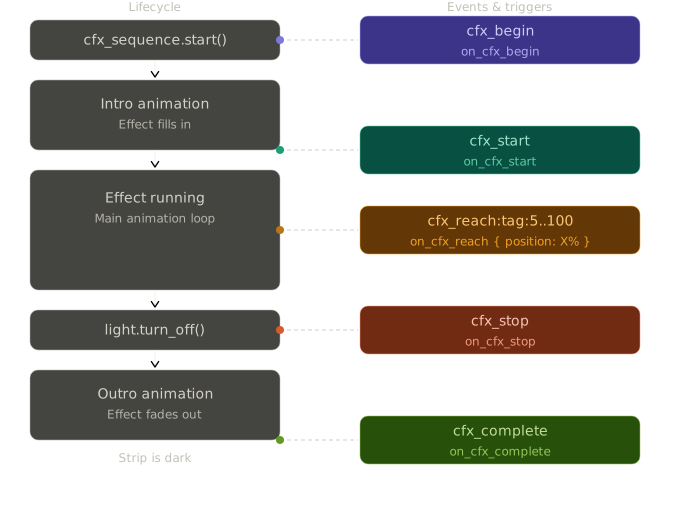
| Stage | YAML trigger | When it fires |
|---|---|---|
| Begin | on_cfx_begin |
Immediately when cfx_sequence.start is called. Nothing is visible yet. |
| Start | on_cfx_start |
The effect starts rendering. If there is an intro, this fires after the intro. |
| Reach | on_cfx_reach |
The leading pixel crosses a threshold you define, such as 50%. |
| Stop | on_cfx_stop |
The outro begins, usually from cfx_sequence.stop or light.turn_off. |
| Complete | on_cfx_complete |
The outro finishes and the strip is fully dark. |
Stop vs complete:
on_cfx_stopfires when the fade-out starts.on_cfx_completefires when the strip is actually dark. Useon_cfx_stopto stagger other strips; useon_cfx_completewhen you need a final done signal.
Your First Sequence
A sequence has two parts:
- A definition under
cfx_sequence:. - An action that starts it.
The minimum definition needs an id, a name, a target light, and an effect:
cfx_sequence:
  - id: my_sequence
    name: "My Sequence"
    lights:
      - my_strip
    effect: "Horizon Sweep"
Then start it from a button, automation, or anything that runs ESPHome actions:
on_press:
  then:
    - cfx_sequence.start: my_sequence
That's it. The effect runs indefinitely until you call cfx_sequence.stop or turn off the light.
Configuration Reference
Core options
| Key | Required | Type | Description |
|---|---|---|---|
id |
Yes | ID | Unique identifier. Used by cfx_sequence.start / .stop. |
name |
Yes | string | Display name shown in the Home Assistant dropdown. |
lights |
Yes | list | One or more target light IDs (must be registered under cfx_light). |
effect |
Yes | string | CFX effect name. |
Parameter overrides
These values apply only while the sequence is running. When a sequence, cfx_set,
or cfx_run sends one of these overrides, ChimeraFX reflects the value into the
matching Home Assistant control so the UI shows what is actually driving the
effect. During that run, the parameter is owned by the sequence/runtime action:
manual changes to the same control may be ignored until the effect is restarted
or the sequence ownership is cleared.
| Key | Range | Description |
|---|---|---|
set_speed |
0-255 | Runtime-only Speed override. |
set_intensity |
0-255 | Runtime-only Intensity override. |
set_palette |
0-255 | Runtime-only Palette override by index. Monochromatic effects ignore palette. |
set_brightness |
0-100% | Overrides the light brightness. |
set_color |
[r,g,b] or [r,g,b,w] |
Overrides the effect color using 0-100 channel percentages. |
set_mirror |
true / false |
Overrides the Mirror switch. |
set_autotune |
true / false |
Overrides the Autotune switch. |
ha_events |
auto / true / false |
Controls Home Assistant event emission for this sequence. auto is the default and behaves like true on root cfx_sequence entries. |
set_force_white |
true / false |
Forces the white channel on eligible RGBW / WRGB strips and SK6812-based setups. |
set_intro |
0-27 | Override the global intro mode for this segment on eligible effects. Architectural effects, Energy, and Chaos Theory keep their authored intros. |
set_outro |
0-27 | Force a global Outro Animation for eligible effects. Architectural effects, Energy, and Chaos Theory keep their authored outros. |
set_inout_dur |
float >= 0.0 |
Overrides intro/outro duration in seconds. |
Speed vs duration:
set_speedonly controls an effect's 0-255 speed parameter when that effect uses one. For static monochromatic architectural holds, the visible fade/reveal timing is driven byset_inout_durinstead. Animated monochromatic/architectural effects, such as Eclipse or Collider-style effects, can still use speed and intensity normally.
Parameters stay locked until the next light.turn_on or cfx_sequence.start
resets them. Omitting a parameter leaves that control live; for example, if a
sequence does not include set_mirror, the Mirror switch remains manually
controllable.
Completion control
| Key | Type | Default | Description |
|---|---|---|---|
iterations |
integer | 0 |
Stop after N complete animation cycles. 0 = loop forever. |
duration |
time | null |
Stop after a fixed wall-clock time (e.g. 10s, 2min). Takes priority over iterations. |
restore |
boolean | true |
Restore the strip's pre-sequence light state when the sequence stops. This includes ON/OFF state, effect, brightness, colour, and colour mode snapshot. Runtime-only overrides such as set_speed, set_intensity, set_palette, set_mirror, and set_autotune are temporary control ownership, not permanent user defaults. |
Restore behavior
restore is intentionally light-state oriented, not control-state oriented.
- If the light was already ON before the sequence started,
restore: truereturns it to that previous effect/colour/brightness snapshot. - If the light was OFF before the sequence started,
restore: truereturns it to OFF. - If a child light is adopted mid-sequence via
cfx_set, its restore baseline is treated as OFF unless explicitly designed otherwise, so stopping the parent sequence cleans the adopted child up without leaving it running. restore: falseskips the saved-state return and the teardown path forces the sequence lights OFF.
Home Assistant event traffic
ha_events only affects Home Assistant event emission. It does not disable on-device YAML triggers such as on_cfx_reach and it exists to keep Home Assistant event traffic useful and scalable.
In multi-strip sequences, child effects can emit large bursts of cfx_reach,
cfx_stop, and cfx_complete events when several strips are active at once.
That traffic is often redundant because the parent sequence is the real
orchestration unit. For that reason, root cfx_sequence entries default to HA
events enabled, while child cfx_set and cfx_run actions default to HA
events disabled. If a child effect is intentionally being used as a public
event source, set ha_events: true to opt back in.
Full annotated example
cfx_sequence:
  - id: seq_id
    name: "Sequence Name"
    lights:
      - light_id
    effect: "Wipe"

    # Parameter overrides
    set_speed:       200
    set_intensity:   128
    set_palette:     4
    set_brightness:  80%
    set_color:       [100, 70, 31]
    set_mirror:      true
    set_autotune:    false
    set_force_white: true
    set_intro:       12
    set_outro:       22
    set_inout_dur:   1.5

    # Completion
    iterations: 1
    duration: 5s
    restore: true

    # Triggers
    on_cfx_start:
      - logger.log: "Effect started"

    on_cfx_reach:
      - position: 10%
        then:
          - cfx_set:
              id: another_strip
              effect: "Horizon Sweep"

    on_cfx_stop:
      - delay: 300ms
      - light.turn_off: another_strip

    on_cfx_complete:
      - logger.log: "Outro finished, strip is dark"
Triggers in Detail
on_cfx_begin
Fires the moment start() is invoked — before any intro animation or rendering. Good for pre-arming other hardware.
on_cfx_begin
cfx_sequence:
  - name: "Sequence Begin"
    id: seq_begin
    lights:
      - rmt1
    effect: "Sonar Reveal"
    on_cfx_begin:
      - light.toggle:
          id: rmt2
  alias: ChimeraFX — CFX Begin
  description: ""
  triggers:
    - trigger: state
      entity_id:
        - event.chimerafx_cfx_events_rmt1
      attribute: event_type
      to:
        - cfx_begin:rmt1
  conditions: []
  actions:
    - action: light.toggle
      metadata: {}
      target:
        entity_id: light.chimerafx_rmt2
      data: {}
  mode: single
on_cfx_start
Fires when the effect is actually rendering its first frame. If the effect has an intro animation, this fires after the intro completes.
on_cfx_start
cfx_sequence:
  - name: "Sequence Start"
    id: seq_start
    lights:
      - rmt1
    effect: "Sonar Reveal"
    on_cfx_start:
      - light.toggle:
          id: rmt2
  alias: ChimeraFX — CFX Start
  description: ""
  triggers:
    - trigger: state
      entity_id:
        - event.chimerafx_cfx_events_rmt1
      attribute: event_type
      to:
        - cfx_start:rmt1
  conditions: []
  actions:
    - action: light.toggle
      metadata: {}
      target:
        entity_id: light.chimerafx_rmt2
      data: {}
  mode: single
on_cfx_reach
Fires when the animation's leading pixel crosses a percentage threshold. You can define as many thresholds as you need.
on_cfx_reach
cfx_sequence:
  - name: "Sequence Reach"
    id: seq_reach
    lights:
      - rmt1
    effect: "Horizon Sweep"
    on_cfx_reach:
      - position: 20%
        then:
          - logger.log: "20 percent reached"
      - position: 50%
        then:
          - logger.log: "Halfway"
  alias: ChimeraFX — CFX Reach
  description: ""
  triggers:
    - trigger: state
      entity_id:
        - event.chimerafx_cfx_events_rmt1
      attribute: event_type
      to:
        - cfx_start:rmt1
  conditions: []
  actions:
    - wait_for_trigger:
        - trigger: state
          entity_id:
            - event.chimerafx_cfx_events_rmt1
          attribute: event_type
          to:
            - cfx_reach:rmt1:20
    - action: persistent_notification.create
      metadata: {}
      data:
        message: RMT1 reached 20 percent
    - wait_for_trigger:
        - trigger: state
          entity_id:
            - event.chimerafx_cfx_events_rmt1
          attribute: event_type
          to:
            - cfx_reach:rmt1:50
    - action: persistent_notification.create
      metadata: {}
      data:
        message: RMT1 reached 50 percent
  mode: single
Looping effects - For continuous effects like Wipe or Chase,
on_cfx_reachfires on every cycle. If you need a one-shot reaction, setiterations: 1or use a flag in your HA automation.Ambient effects - Effects without a sweep direction (Aurora, Fire, Ocean, Plasma) never fire
on_cfx_reach. See Effect types below.
on_cfx_stop
Fires the instant the outro animation begins. This is the best trigger to coordinate multiple strips - start their outros here so everything fades in sync (or staggered with a delay).
on_cfx_stop
cfx_sequence:
  - name: "Sequence Stop"
    id: seq_stop
    lights:
      - rmt1
    effect: "Venetian"
    duration: 8s
    on_cfx_stop:
      - light.toggle:
          id: rmt2
  alias: ChimeraFX — CFX Stop
  description: ""
  triggers:
    - trigger: state
      entity_id:
        - event.chimerafx_cfx_events_rmt1
      attribute: event_type
      to:
        - cfx_stop:rmt1
  conditions: []
  actions:
    - action: light.toggle
      metadata: {}
      target:
        entity_id: light.chimerafx_rmt2
      data: {}
  mode: single
on_cfx_complete
Fires when the outro finishes and the strip is completely dark.
on_cfx_complete
cfx_sequence:
  - name: "Sequence Complete"
    id: seq_complete
    lights:
      - rmt1
    effect: "Curtain Sweep"
    duration: 8s
    on_cfx_complete:
      - light.toggle:
          id: rmt2
  alias: ChimeraFX — CFX Complete
  description: ""
  triggers:
    - trigger: state
      entity_id:
        - event.chimerafx_cfx_events_rmt1
      attribute: event_type
      to:
        - cfx_complete:rmt1
  conditions: []
  actions:
    - action: light.toggle
      metadata: {}
      target:
        entity_id: light.chimerafx_rmt2
      data: {}
  mode: single
Heads up -
on_cfx_completeonly fires when a real outro runs: whenduration:expires or a monochromatic effect finishes fading. It does not fire on a plainlight.turn_off. If your automation needs a "done" signal for all cases, listen to thelight.turn_offentity state in HA instead.
Starting and Stopping Sequences
cfx_sequence.start and cfx_sequence.stop exist because sequences are meant to
be orchestration primitives, not just effect presets.
They give you a clean way to:
- start a named sequence from on-device YAML with no HA round-trip,
- stop that sequence while preserving normal outro / restore semantics,
- stop an entire runtime branch when that sequence has spawned children via
cfx_run, - bind sequence control to real hardware and local automation sources such as buttons, switches, PIR sensors, mmWave presence sensors, intervals, scripts, template logic, and other ESPHome triggers,
- and still expose a simple control surface to Home Assistant for dashboards and automations.
There are three practical ways to control sequences:
- On-device ESPHome actions, for low-latency orchestration and full sequence semantics.
- Home Assistant entities, for manual control and simple automations.
- Home Assistant API calls, for direct scripted control from HA.
On-device ESPHome Actions
This is the native sequence control path. Use it when your logic lives in the ESPHome node and you want intros, outros, restore, and trigger timing to remain fully local.
This is also what makes sequences especially powerful: cfx_sequence.start and
cfx_sequence.stop are ordinary ESPHome actions, so they can be attached to
almost any trigger source the node supports.
In practice, that means a sequence can be started or stopped by:
- a hardware button or touch input,
- a template switch,
- a PIR or presence sensor,
- a reed switch, door contact, or limit switch,
- a timer, interval, sunrise/sunset rule, or script,
- or a Home Assistant automation when you do want remote orchestration.
So while Home Assistant integration is important, the sequence engine is not dependent on Home Assistant. It can operate as a fully local choreography layer inside the ESP node itself.
Starting uses the sequence id:
- cfx_sequence.start: my_sequence
Stopping also uses the sequence id and supports two modes:
- cfx_sequence.stop: my_sequence
This is shorthand for:
- cfx_sequence.stop:
    id: my_sequence
    mode: self
mode: self stops only the addressed sequence.
If that sequence spawned runtime children via cfx_run, you can stop the whole
runtime branch gracefully:
- cfx_sequence.stop:
    id: my_sequence
    mode: tree
mode: tree walks the cfx_run ancestry created by that sequence, stopping
descendants first and then the addressed parent. This is a graceful
sequence-aware stop, not a panic kill:
- Each sequence in the tree keeps its own outro behaviour.
- Each sequence in the tree keeps its own
restorehandling. - Tree membership is based on runtime parent/child spawn ancestry, not on which lights happen to overlap.
This makes mode: tree useful for cascade-style orchestrations where one
sequence launches other sequences internally and you want one stop command to
unwind the whole branch cleanly.
Use mode: self for normal targeted stops.
Use mode: tree when the addressed sequence has launched child runs that should
be unwound with it.
Simple hardware-bound examples:
binary_sensor:
  - platform: gpio
    pin: GPIO0
    name: "Start Button"
    on_press:
      then:
        - cfx_sequence.start: my_sequence

  - platform: gpio
    pin: GPIO4
    name: "Stop Button"
    on_press:
      then:
        - cfx_sequence.stop:
            id: my_sequence
            mode: self

  - platform: gpio
    pin: GPIO12
    name: "Hall PIR"
    device_class: motion
    on_press:
      then:
        - cfx_sequence.start: hallway_alert
    on_release:
      then:
        - cfx_sequence.stop:
            id: hallway_alert
            mode: tree
Home Assistant Entities
When at least one cfx_sequence is defined, ChimeraFX creates two HA-facing
control entities automatically:
- Internal Sequences: a select dropdown that starts a sequence when you pick its name.
- Stop All: a hard panic button that force-stops every sequence and turns off every known ChimeraFX light or segment on the device.
The dropdown is the friendliest way to operate sequences from dashboards:
- choose a sequence name to start it,
- choose
Noneto stop the currently selected sequence.
This path is intentionally simple and human-friendly. It is a good fit for UI control, quick testing, and HA automations that just need “start this” or “stop the active one”.
Home Assistant Direct API Calls
If the node has api: enabled, the component also registers two custom ESPHome
API services:
cfx_sequence_startcfx_sequence_stop
These are meant for Home Assistant scripts and automations that want to call a sequence directly instead of driving the dropdown.
Important differences from the on-device actions:
- The API calls match by sequence
name, not by sequenceid. cfx_sequence_startstarts the first sequence whose name matches the provided string.cfx_sequence_stopcurrently performs a normal sequence stop equivalent tomode: self.mode: treeis currently available in the on-device ESPHome action path, not in the HA API service path.
In Home Assistant, the exact service/action name exposed by ESPHome depends on your device slug. The easiest way to find it is to open Developer Tools -> Actions and search for:
cfx_sequence_startcfx_sequence_stop
A typical call looks like this:
action: esphome.your_device_cfx_sequence_start
data:
  sequence: "My Sequence"
And the corresponding stop call:
action: esphome.your_device_cfx_sequence_stop
data:
  sequence: "My Sequence"
Use the direct API path when you want HA to target a sequence by name without manipulating the dropdown state first.
cfx_set - Quick Parameter Injection
cfx_set applies temporary parameters to a light without declaring a full sequence. It is useful inside on_cfx_reach when one strip should cue another strip at a specific point.
Values supplied by cfx_set are reflected in the target light's controls and
own those controls while the injected effect is active. To keep a control
manually adjustable, omit that set_* option from the action.
on_cfx_reach:
  - position: 25%
    then:
      - cfx_set:
          id: led_strip
          effect: "Wipe"
          set_speed: 255
          set_intensity: 128
          set_palette: 4
| Key | Type | Description |
|---|---|---|
id |
light ID | Target light (required). |
effect |
string | Effect name. If set, calls light.turn_on with this effect. Omit to only change parameters without touching the current effect. |
set_speed |
0-255 | Runtime-only Speed override. |
set_intensity |
0-255 | Runtime-only Intensity override. |
set_palette |
0-255 | Runtime-only Palette override by index. Monochromatic effects ignore palette. |
set_brightness |
0-100% | Overrides the light brightness. |
set_color |
[r,g,b] or [r,g,b,w] |
Overrides the effect color using 0-100 channel percentages. |
set_mirror |
true / false |
Overrides the Mirror switch. |
set_autotune |
true / false |
Overrides the Autotune switch. |
ha_events |
auto / true / false |
Controls Home Assistant event emission for the injected child effect. auto is the default and resolves to false for cfx_set. |
set_force_white |
true / false |
Forces the white channel on eligible RGBW / WRGB strips and SK6812-based setups. |
set_intro |
0-27 | Override the global intro mode for this segment on eligible effects. Architectural effects, Energy, and Chaos Theory keep their authored intros. |
set_outro |
0-27 | Force a global Outro Animation for eligible effects. Architectural effects, Energy, and Chaos Theory keep their authored outros. |
set_inout_dur |
float >= 0.0 |
Overrides intro/outro duration in seconds. |
Speed vs duration:
set_speedis not an alias forset_inout_dur. If the target effect is a static monochromatic hold, useset_inout_durto control the authored intro/outro timing.
cfx_run - Spawn a Runtime Sequence
cfx_run starts a self-contained, pool-backed sequence at runtime. It supports the same set_* overrides as cfx_set, plus iterations and lifecycle triggers on the spawned run.
Like root sequences and cfx_set, supplied set_* values are reflected in the
target controls and own those controls for the lifetime of the spawned run.
on_cfx_reach:
  - position: 50%
    then:
      - cfx_run:
          id: led_strip
          effect: "Gas Discharge"
          set_inout_dur: 5
          set_force_white: true
          iterations: 1
| Key | Type | Description |
|---|---|---|
id |
light ID | Target light (required). |
effect |
string | Effect name to spawn (required). |
set_speed |
0-255 | Runtime-only Speed override. |
set_intensity |
0-255 | Runtime-only Intensity override. |
set_palette |
0-255 | Runtime-only Palette override by index. Monochromatic effects ignore palette. |
set_brightness |
0-100% | Brightness override. |
set_color |
[r,g,b] or [r,g,b,w] |
Color override using 0-100 channel percentages. |
set_mirror |
true / false | Mirror override. |
set_autotune |
true / false | Autotune override. |
ha_events |
auto / true / false |
Controls Home Assistant event emission for the spawned run. auto is the default and resolves to false for cfx_run. |
set_force_white |
true / false | Force white-channel rendering on eligible RGBW / WRGB strips and SK6812-based setups. |
set_intro |
0-27 | Override the global intro mode for this segment on eligible effects. Architectural effects, Energy, and Chaos Theory keep their authored intros. |
set_outro |
0-27 | Force a global Outro Animation for eligible effects. Architectural effects, Energy, and Chaos Theory keep their authored outros. |
set_inout_dur |
float >= 0.0 |
Intro/outro duration override in seconds. |
iterations |
integer | Number of cycles to run. Default is 1. |
on_cfx_start |
automation | Fires when the spawned effect starts rendering. |
on_cfx_stop |
automation | Fires when the spawned outro begins. |
on_cfx_complete |
automation | Fires when the spawned outro finishes. |
on_cfx_reach |
automation | Positional triggers for the spawned run. |
Speed vs duration:
set_speedremains the effect speed parameter. Useset_inout_durfor intro/outro duration, especially on static monochromatic architectural effects where speed may not visibly change the hold.
Home Assistant Integration
When any cfx_sequence is defined, ESPHome automatically creates a CFX Events entity. It fires named events into HA that your automations can listen to.
Event format
Events use the strip's slug as a tag. A light named RGB Light becomes the tag rgb_light.
| Event | When it fires |
|---|---|
cfx_begin:<tag> |
The instant a sequence or a single effect is called. |
cfx_start:<tag> |
Effect begins rendering. |
cfx_reach:<tag>:<pct> |
Milestone crossed - fires at fixed 10% steps (10, 20, 30 ... 100). |
cfx_stop:<tag> |
Outro begins. |
cfx_complete:<tag> |
Duration expired or monochromatic outro finished. |
On-device vs HA precision
Triggers written directly in ESPHome YAML (on_cfx_reach) are evaluated every frame and fire at any threshold you define, including sub-10% ones like 33%.
HA events are intentionally quantized to 10% steps to avoid flooding the event queue at high animation speeds. If you need sub-10% precision, use on-device triggers.
Don't set
batch_delay: 0msin yourapi:block. It will causecfx_reachevents to drop at high effect speeds, regardless ofmax_send_queue. The defaultbatch_delay: 200msis the safe value.
Effect types and cfx_reach
Not every effect sweeps in a direction, so cfx_reach doesn't behave the same for all of them:
| Type | Examples | cfx_reach behaviour |
|---|---|---|
| Progressive | Scanner, Chase, Sunrise, Dissolve... | Sweeps 0-100% and loops. Milestones fire reliably every cycle. |
| Wipe-type | Wipe, Color Sweep... | Has a fill pass (0-100%) and an erase pass (0-100%). Milestones fire on both passes. Use mode: single in HA if you only want to react to the fill. |
| Ambient | Aurora, Fire, Ocean, Plasma... | No directional sweep. cfx_reach never fires for these effects. |
Stop All
A Stop All button entity is created automatically in HA whenever sequences are defined. It is a hard kill-all panic control for dashboards or emergency automations.
Use Stop All when you want every ChimeraFX sequence, cfx_run, light, and
segment stopped immediately. It does not restore previous states and does not
wait for outros.
Use cfx_sequence.stop with mode: self or mode: tree when you want a
targeted, sequence-aware shutdown that still respects normal sequence teardown.
Select None in Internal Sequences when you want the friendly UI path for
stopping the active selected sequence.
Use the HA API start/stop calls when Home Assistant needs to target a specific
sequence directly by name.
Examples
Cascade with Staggered Stop
Three strips start one after another as the primary strip sweeps forward. When the primary stops, all three outros start in a staggered fade.
Cascade with staggered stop
cfx_sequence:
  - id: seq_strip1
    name: "Cascade with staggered stop"
    lights:
      - rmt2
    effect: "Horizon Sweep"
    on_cfx_reach:
      - position: 10%
        then:
          - light.turn_on:
              id: rmt3
              effect: "Horizon Sweep"
      - position: 20%
        then:
          - light.turn_on:
              id: rmt4
              effect: "Horizon Sweep"
    on_cfx_stop:
      - delay: 100ms
      - light.turn_off:
          id: rmt3           # starts outro 100ms later
      - delay: 100ms
      - light.turn_off:
          id: rmt4           # starts outro 100ms later
  alias: ChimeraFX — Cascade with staggered stop
  description: ""
  triggers:
    - trigger: state
      entity_id:
        - event.chimerafx_cfx_events_rmt2
      attribute: event_type
      to:
        - cfx_reach:rmt2:10
  actions:
    - action: light.turn_on
      metadata: {}
      data:
        effect: Horizon Sweep
      target:
        entity_id: light.chimerafx_rmt3
    - wait_for_trigger:
        - trigger: state
          entity_id:
            - event.chimerafx_cfx_events_rmt2
          attribute: event_type
          to:
            - cfx_reach:rmt2:20
    - action: light.turn_on
      metadata: {}
      data:
        effect: Horizon Sweep
      target:
        entity_id: light.chimerafx_rmt4
    - wait_for_trigger:
        - trigger: state
          entity_id:
            - event.chimerafx_cfx_events_rmt2
          attribute: event_type
          to:
            - cfx_stop:rgb_light
            - cfx_stop:rmt2
          enabled: true
    - delay:
        hours: 0
        minutes: 0
        seconds: 0
        milliseconds: 100
    - action: light.turn_off
      metadata: {}
      data: {}
      target:
        entity_id: light.chimerafx_rmt3
    - delay:
        hours: 0
        minutes: 0
        seconds: 0
        milliseconds: 100
    - action: light.turn_off
      metadata: {}
      data: {}
      target:
        entity_id: light.chimerafx_rmt4
  mode: single
  max_exceeded: silent
  conditions: []
Gas Discharge under the Curtains
Two strips start together, and when they reach 90% the third strip starts building a Gas Discharge effect.
Gas Discharge under the Curtains
cfx_sequence:
  - id: gas_curtain_light
    name: "Gas Discharge under the Curtains"
    lights: [ws_strip, ws_strip2]
    effect: "Curtain Sweep"
    on_cfx_reach:
      - position: 90%
        then:
          - cfx_set:
              id: led_strip
              effect: "Gas Discharge"
  alias: ChimeraFX — Gas Discharge under the Curtains
  description: ""
  triggers:
    - trigger: state
      entity_id:
        - button.chimerafx_button
      to: null
  conditions: []
  actions:
    - action: light.turn_on
      metadata: {}
      target:
        entity_id:
          - light.YOUR_DEVICE_ws_strip
          - light.YOUR_DEVICE_ws_strip2
      data:
        effect: Curtain Sweep
    - wait_for_trigger:
        - trigger: state
          entity_id:
            - event.YOUR_DEVICE_cfx_events
          attribute: event_type
          to:
            - cfx_reach:ws_strip:90
          enabled: true
    - action: light.turn_on
      metadata: {}
      target:
        entity_id: light.YOUR_DEVICE_rgb_light
      data:
        effect: Gas Discharge
  mode: single
Interference Takeover
Two mirrored strips open the scene with the same slow monochromatic sweep. At the midpoint, the center pair enters with Venetian. Ten seconds later the opening pair fades away and the center pair takes over with Interference.
Interference Takeover
cfx_sequence:
  - id: seq_interference_takeover
    name: "Interference Takeover"
    lights:
      - rmt1
    effect: "Horizon Sweep"
    set_speed: 128
    set_brightness: 80%
    set_color: [100, 45, 0, 0]
    set_autotune: false
    set_inout_dur: 8
    restore: true

    on_cfx_begin:
      - cfx_set:
          id: rmt4
          effect: "Horizon Sweep"
          set_speed: 128
          set_brightness: 80%
          set_color: [100, 45, 0, 0]
          set_mirror: true
          set_autotune: false
          set_inout_dur: 8
          ha_events: true

    on_cfx_reach:
      - position: 50%
        then:
          - cfx_set:
              id: rmt2
              effect: "Venetian"
              set_speed: 128
              set_brightness: 75%
              set_color: [100, 45, 0, 0]
              set_autotune: false
              set_inout_dur: 4
              ha_events: true
          - cfx_set:
              id: rmt3
              effect: "Venetian"
              set_speed: 128
              set_brightness: 75%
              set_color: [100, 45, 0, 0]
              set_mirror: true
              set_autotune: false
              set_inout_dur: 4
              ha_events: true
          - delay: 10s
          - light.turn_off:
              id: rmt1
          - light.turn_off:
              id: rmt4
          - cfx_set:
              id: rmt2
              effect: "Interference"
              set_autotune: true
              set_color: [65, 35, 100, 0]
              ha_events: true
          - cfx_set:
              id: rmt3
              effect: "Interference"
              set_autotune: true
              set_color: [65, 35, 100, 0]
              ha_events: true
  alias: ChimeraFX - Interference Takeover
  description: ""
  triggers:
    - trigger: state
      entity_id:
        - button.chimerafx_button
      to: null
  conditions: []
  actions:
    - action: switch.turn_on
      target:
        entity_id: switch.chimerafx_rmt1_ha_events
    - action: switch.turn_off
      target:
        entity_id: switch.chimerafx_rmt1_autotune
    - action: number.set_value
      target:
        entity_id: number.chimerafx_rmt1_speed
      data:
        value: 128
    - action: number.set_value
      target:
        entity_id: number.chimerafx_rmt1_in_out_duration
      data:
        value: 8
    - action: light.turn_on
      metadata: {}
      target:
        entity_id: light.chimerafx_rmt1
      data:
        effect: Horizon Sweep
        brightness_pct: 80
        rgbw_color: [255, 115, 0, 0]
    - action: switch.turn_on
      target:
        entity_id: switch.chimerafx_rmt4_ha_events
    - action: switch.turn_off
      target:
        entity_id: switch.chimerafx_rmt4_autotune
    - action: switch.turn_on
      target:
        entity_id: switch.chimerafx_rmt4_mirror
    - action: number.set_value
      target:
        entity_id: number.chimerafx_rmt4_speed
      data:
        value: 128
    - action: number.set_value
      target:
        entity_id: number.chimerafx_rmt4_in_out_duration
      data:
        value: 8
    - action: light.turn_on
      metadata: {}
      target:
        entity_id: light.chimerafx_rmt4
      data:
        effect: Horizon Sweep
        brightness_pct: 80
        rgbw_color: [255, 115, 0, 0]
    - wait_for_trigger:
        - trigger: state
          entity_id:
            - event.chimerafx_cfx_events_rmt1
          attribute: event_type
          to:
            - cfx_reach:rmt1:50
    - action: switch.turn_on
      target:
        entity_id: switch.chimerafx_rmt2_ha_events
    - action: switch.turn_off
      target:
        entity_id: switch.chimerafx_rmt2_autotune
    - action: switch.turn_on
      target:
        entity_id: switch.chimerafx_rmt3_ha_events
    - action: switch.turn_off
      target:
        entity_id: switch.chimerafx_rmt3_autotune
    - action: switch.turn_on
      target:
        entity_id: switch.chimerafx_rmt3_mirror
    - action: number.set_value
      target:
        entity_id:
          - number.chimerafx_rmt2_speed
          - number.chimerafx_rmt3_speed
      data:
        value: 128
    - action: number.set_value
      target:
        entity_id:
          - number.chimerafx_rmt2_in_out_duration
          - number.chimerafx_rmt3_in_out_duration
      data:
        value: 4
    - action: light.turn_on
      metadata: {}
      target:
        entity_id:
          - light.chimerafx_rmt2
          - light.chimerafx_rmt3
      data:
        effect: Venetian
        brightness_pct: 75
        rgbw_color: [255, 115, 0, 0]
    - delay:
        seconds: 10
    - action: light.turn_off
      metadata: {}
      target:
        entity_id:
          - light.chimerafx_rmt1
          - light.chimerafx_rmt4
      data: {}
    - action: switch.turn_on
      target:
        entity_id:
          - switch.chimerafx_rmt2_autotune
          - switch.chimerafx_rmt3_autotune
    - action: light.turn_on
      metadata: {}
      target:
        entity_id:
          - light.chimerafx_rmt2
          - light.chimerafx_rmt3
      data:
        effect: Interference
        rgbw_color: [166, 89, 255, 0]
  mode: single
  max_exceeded: silent